


 Why Find and Replace Tool For Excel?
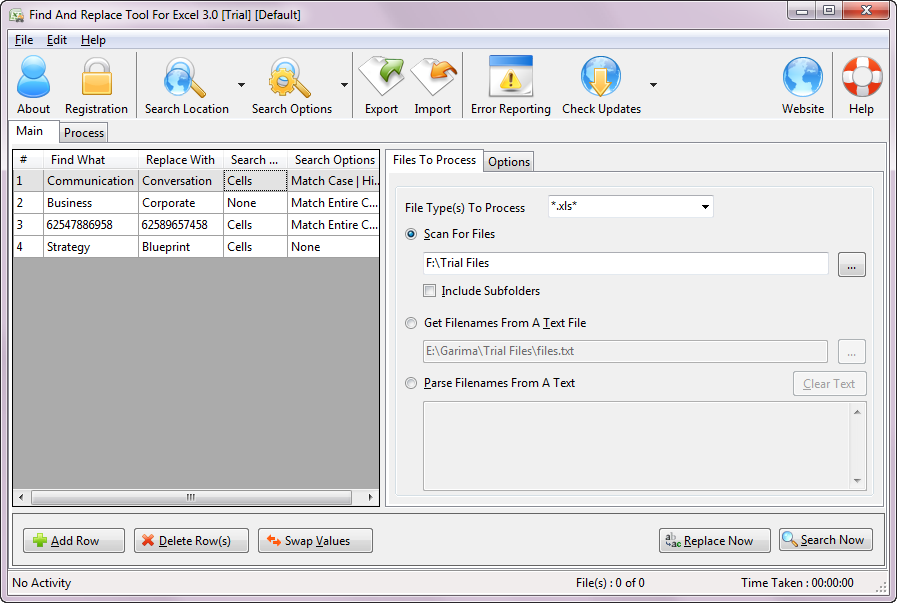
- No limit on number of Spreadsheets it can process.
- Application is using Microsoft Office's object model which give you speed and accuracy of Microsoft Excel.
- Import, export and save list of find and replace items.
- You can search and replace at define search location only.
- It can Save all the options user frequently uses like name of the folder, password of spreadsheets and other options.
- Shows a report which after completion of replacement, states how many changes made and on which file.
- Find or search only mode where you can see how many potential changes available
- It can process password protected files.
- Compatible with 32 and 64 bit version of Microsoft Windows 10, 7, Windows 8, Windows Xp, Windows Vista, Windows 2003 and Windows 2008. Works with Microsoft Office Xp, 2003, 2007, 2010
Testimonials
"We have many separate .xls files that, if the government makes a change in the wording of a form, they all have to be updated. Find and Replace Tool for Excel worked great and saved us a lot of time updating about 400 .xls files. "
"We have excel files that are used by a third party application provider. We are planning to replace server A by a new one server B. Per instance of the application there are about 10 to in some cases 1000 excel files which need to be updated. If we need to do that by hand for every excel file it would take way to long since we only have a limited time frame in which we can migrate one instance to the new server. Find and Replace Tool for Excel worked great. It’s simple in its use and quick with finding and replacing within the excel files. In other words exactly what we were looking for"